



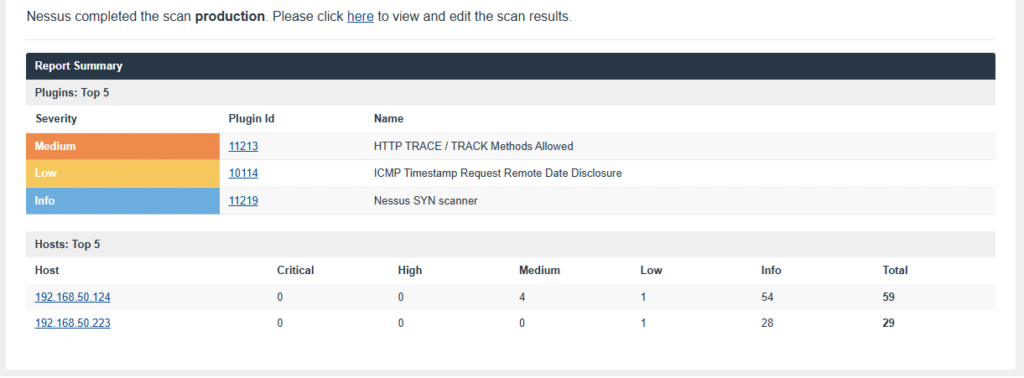
Recently, I used the Nessus vulnerability scanner against my web server and database server to identify security issues. Nessus found several vulnerabilities with different severity levels. Some were low-severity findings, while others were more serious. In this post, I want to focus on one of the medium-severity findings: HTTP TRACE / TRACK Methods Allowed. Even though this was not a critical vulnerability, I fixed it immediately. When it comes to public-facing websites, every unnecessary exposure increases risk. Good security is not just about fixing critical issues. It is also about reducing your attack surface wherever possible. Let’s look at what this vulnerability is, why it matters, and how I fixed it on my RHEL 10 Apache web server.
What Is the HTTP TRACE Method?
The HTTP TRACE method is a built-in feature designed for debugging and diagnostics. When a client sends a TRACE request, the web server returns the exact request it received, including request headers. On the surface, this may seem harmless. However, attackers can abuse TRACE requests in combination with other techniques such as Cross-Site Tracking (XST) and Cross-Site Scripting (XSS). In certain scenarios, an attacker may be able to capture sensitive information such as:
- Authentication cookies
- Session tokens
- Request headers
- User related information
This can potentially help attackers bypass security protections and gather information that should never be exposed. During my Nessus scan, I discovered that TRACE requests were enabled on my Apache web server. Since there is rarely a valid reason to leave this feature enabled on a production website, I decided to disable it.
Why Fix It?
Some administrators see a medium-severity finding and think it can wait. My approach is different. A vulnerability does not have to be critical to be dangerous. Attackers often combine multiple weaknesses together. One small issue may not lead to a compromise by itself, but it can become part of a larger attack chain. If a feature is unnecessary and introduces risk, it is usually best to disable it.
Step 1: Back Up the Apache Configuration File
Before making any changes, always create a backup of the configuration file. If something goes wrong, you can quickly restore the original configuration. Run the following command to create a backup:
sudo cp /etc/httpd/conf/httpd.conf /etc/httpd/conf/BAK_httpd.confNext, open the Apache configuration file using your favorite editor. I prefer Vim:
sudo vim /etc/httpd/conf/httpd.confStep 2: Disable TRACE Requests
Scroll to the bottom of the configuration file. Just before:
IncludeOptional conf.d/*.confAdd the following line:
# Disable HTTP TRACE method to mitigate XST/XSS vulnerability
TraceEnable off
It should look similar to this:
# Disable HTTP TRACE method to mitigate XST/XSS vulnerability
TraceEnable off
IncludeOptional conf.d/*.conf
Save the file and exit the editor.
Step 3: Verify the Configuration
Before restarting Apache, always verify that the configuration is valid. Run:
sudo apachectl configtestIf everything is correct, you should see:
Syntax OKIf you see any errors, review your changes and fix any typos before proceeding. Once the configuration passes validation, restart Apache:
sudo systemctl restart httpdStep 4: Verify the Fix
After disabling TRACE requests, you should confirm that the change worked.
Method 1: Use Curl
Run the following command:
curl -I -X TRACE https://localhost/If your site does not use SSL, use:
curl -I -X TRACE http://localhost/Before the Fix
The server may respond with:
HTTP/1.1 200 OKThis indicates that TRACE requests are being accepted.
After the Fix
The server should reject the request and return:
HTTP/1.1 405 Method Not Allowedor
HTTP/1.1 403 ForbiddenThis confirms that TRACE requests have been disabled.
Method 2: Run a Nessus Rescan
The second verification method is to perform another Nessus scan. Once the scan completes, the HTTP TRACE / TRACK Methods Allowed finding should no longer appear in the results. This is usually my preferred method because it validates the fix from the same tool that originally detected the vulnerability.
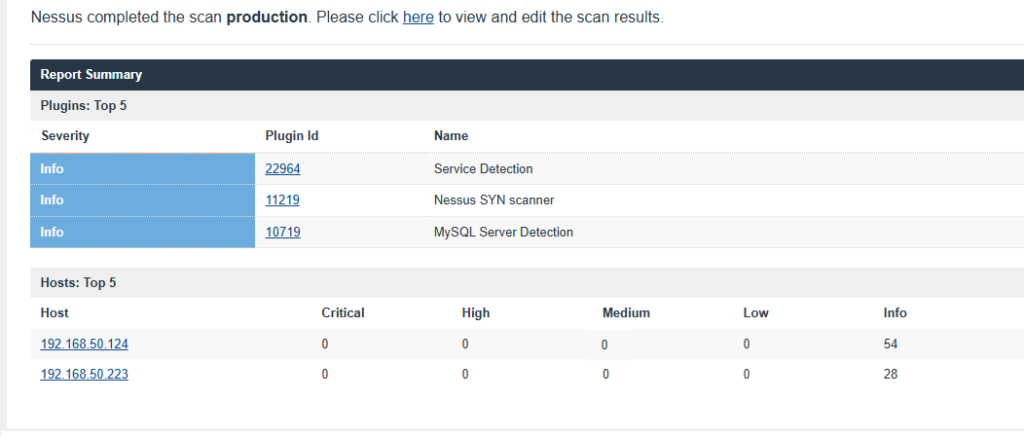
One thing I have learned while securing public-facing systems is that attackers do not care about vulnerability scores. If they find an opportunity, they will try to take advantage of it. Whether a finding is low, medium, or high severity, it is worth evaluating and fixing whenever possible. Hardening a server is often about addressing many small issues before they become larger problems.
In this case, the fix was simple:
- Back up the configuration file.
- Add
TraceEnable off. - Verify the configuration.
- Restart Apache.
- Confirm the change using Curl or Nessus.
The entire process takes only a few minutes and removes an unnecessary risk from your web server.
The HTTP TRACE / TRACK Methods Allowed vulnerability is a medium-severity finding that is commonly discovered during vulnerability scans. Fortunately, it is also one of the easiest vulnerabilities to fix on Apache. If your website is accessible from the internet, take the time to review findings like this and harden your environment. Security is not about a single fix. It is about making continuous improvements and closing as many doors as possible before attackers find them first.